
Software for a jar business has one job. It should make the day’s numbers trustworthy at the moment they are created, which is at the customer’s door. Everything else, billing, dues, reports, depends on that. This section walks through a full working day, what to set up before it can run, and how to judge any tool or method you are considering.
What to set up first
Do these in order. Skipping ahead is the most common reason a new system feels like extra work.
- Customers with a route. Name, address, phone, and the route that serves them. A customer without a route never appears on anyone’s list. In Pyaau a new customer must be set to pay daily or pay monthly. Monthly customers are billed on an invoice. A daily payer is not invoiced, and their ledger runs on its own.
- Your product list and catalogue prices. Most businesses start with the 20-litre jar. Add other sizes only if you really deliver them.
- Standing orders. For each customer, how many jars, how often (daily, alternate days, weekly), and the price if it differs from the catalogue. The standing order is what builds tomorrow’s route, so mistakes here repeat every day.
- Opening balances. What each customer owes you today, or has paid ahead, and how many of your jars are sitting with them. Without these, every report starts wrong. In Pyaau you type both when you add the customer. They show as the customer’s first row, “Opening balance”, and no invoice is made for it.
- Driver logins. One per driver, so you can later see who recorded what.
Plan an afternoon for the first three. Plan another for opening balances, because they need a physical count and a few phone calls.
A working day, step by step
Example, made-up business. Example Aqua runs two routes with two drivers. The numbers below are round and illustrative. They are not results from any real business.
The night before
At night the day’s route is built for each driver from the customers and the standing orders. Example Aqua has a daily customer who takes 2 jars, a weekly customer who takes 5 on Mondays, and a temporary extra of 1 jar that ends on Friday. Tomorrow is Monday, so all three show up. The office does not type a list. It only adds the odd thing that came by phone in the evening.
7:30 am, the driver opens the route
Driver Ramesh opens his route and sees his stops as cards, each with the customer and the planned jars. He loads the vehicle against the total, not against memory.
At the door
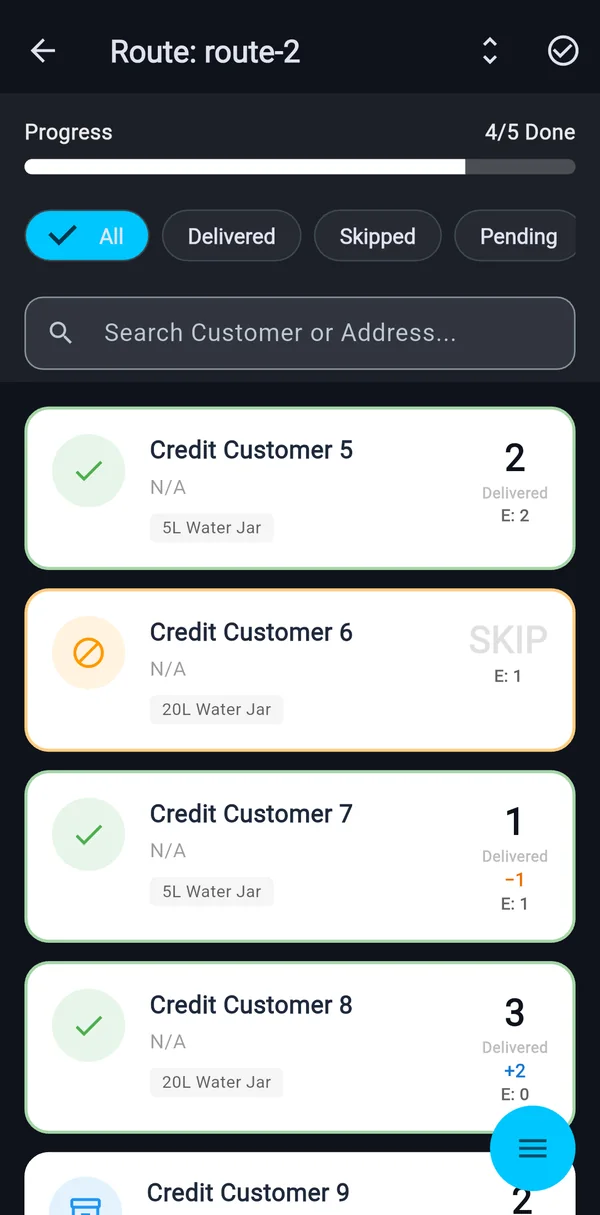
At the first stop he hands over 2 jars. He swipes the stop to delivered. He opens it if the numbers differ. The customer gives back 2 empties, so he taps Match and empties become 2. At the next stop the customer wants 3 instead of 2. He sets delivered to 3 and the stop shows +1. That is an extra, visible straight away, and the office can see it was above plan.
At the third stop nobody is home. He swipes skip and picks a reason. A neighbour hands over 1 empty from the doorstep, and he records it, because a skipped stop keeps its empties.
Midday, the office
The office can see which stops are done, which are skipped and why. A customer calls to say “send one more jar today”. The office records it as an extra order for the day. The route and the day’s progress stay in one place, so nobody has to phone the driver to ask what is pending.
Evening, closing the run
Ramesh returns with 11 empties against 14 delivered. The close-of-day summary shows delivered, skipped, extras, empties and the bottle balance. The office reviews the gaps with him while he is still in the yard. If a count looks wrong, it is fixed now, with the driver present. Then the office locks the run for the day.
Mistakes that wreck the data
- Letting drivers fill the day in at night. Counts written from memory are guesses. The system only works if the swipe happens at the door.
- Treating a skip as a delivery. If a stop was missed, record it as skipped with the real reason. A pattern of skips at one address tells you something you will otherwise miss.
- Never cleaning standing orders. A customer who stopped taking jars three weeks ago still gets a stop built every day until someone ends the order.
- Ignoring short and extra. A -1 at the same address twice a week means the standing order is wrong, or jars are going somewhere. Look at it weekly.
- Skipping the lock. Without a close, edits can arrive days later and disputes have nothing firm behind them.
- Starting with every customer at once. Begin with one route for two weeks. Fix the set-up on a small group, then add the rest.
A checklist for judging any software or method
Use this for a register, a spreadsheet or an app.
- Can a driver record a stop in a few seconds, standing, with one hand?
- Are jars delivered and empties returned recorded as two separate numbers?
- Does a missed stop need a reason?
- Is the route prepared for the driver, or does someone copy it out each morning?
- Can the office see progress during the day without calling anyone?
- Does it show a difference from plan on the stop itself?
- Can a day be closed so that old records stop changing?
- Can you see what a customer owes from the same place the deliveries are recorded?
- If the phone is lost or changed, is your data still safe somewhere?
- Can you leave? Ask how you would get your customer list and history out.
For a paper register, most of these answers are no, and that may be acceptable at thirty customers. The comparison in paper vs spreadsheet vs app for jar delivery goes through where each starts to strain.
What the data looks like in Pyaau
Everything below is a screen that exists in the app today.
- Route list. Each route and its progress, for example 4 of 5 stops completed.
- Route run. The day’s stops as cards. Delivered stops show their empties. A skip needs a reason. Short stops show -1 and extras show +2.
- Stop expanded. Delivered and Empties counters, a Match button, a cash received prompt, Add Extra and a way to mark a stop as actually skipped.
- Skip Rest. If a whole run cannot be finished, skip every open stop with one reason. A confirmation shows how many stops, and there is an undo.
- Customer page. One timeline of deliveries and payments with the balance after each row for the last 30 days, and the jars held per product, updated on every delivery. If the empties entered are more than the customer holds, the stop warns and still saves.
- Run summary. Delivered, skipped, extras, empties, bottle balance, short jars and above planned, with Lock Run.
- Home dashboard. Collected today and this month, the delivered ring, billed this month, customer outstanding and extra jars.
- Standing orders. Regular, extra on top, or temporary with an end date, each with its own price that falls back to the catalogue price.
- Events, Business summary and CSV exports. Events are one-time bulk orders. The Business summary and the CSV exports are built in the app.
The pattern behind these screens is covered in what to record on every jar delivery. If you run more than one route, running multiple delivery routes explains how to read runs side by side.
Invoices can be shared as a PDF from the phone through WhatsApp or any other app. Coming next: WhatsApp billing and a web admin panel.